

Description
Download SaadCreations – Website Builder, Blog Builder, Online Store
Overview
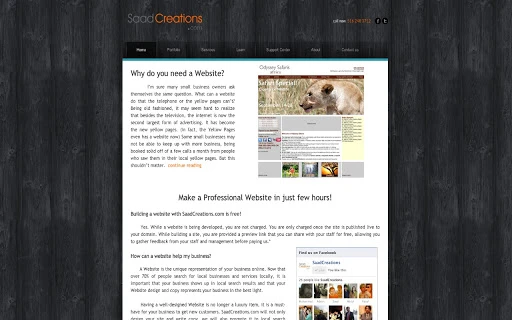
SaadCreations is a desktop application designed to simplify the process of creating websites, blogs, and online stores. Built with accessibility in mind, it empowers users with no technical background to build professional digital presences using a drag-and-drop interface. The software enables rapid website creation, allowing individuals and businesses to launch their online presence in minutes. It is particularly suited for small business owners, entrepreneurs, and content creators who need a straightforward solution for web development without coding knowledge.
Target users include those seeking to establish a web presence for personal branding, e-commerce, or marketing purposes. The application supports the creation of mobile-optimized sites, integrates SEO tools, and includes features such as form building, image galleries, and traffic analytics. Its service offerings extend beyond website creation to include mobile websites, Android app development, social media integration, and graphic design—making it a comprehensive digital marketing solution.
Developed by SaadCreations, a company specializing in web design, development, and digital marketing, the software reflects a focus on results-driven solutions. The developer has emphasized client relationships and long-term support, noting that some clients have remained engaged since the company’s inception. The software is designed to be intuitive and efficient, ideal for users who want to leverage the internet to grow their business.
Key Features & Capabilities
- Drag & Drop Website Builder: Allows users to design websites by dragging elements onto a canvas, eliminating the need for coding.
- 100+ Professional Themes: Offers a wide selection of customizable templates for various industries and purposes.
- Cloud Hosting Included: Provides built-in hosting, simplifying deployment and maintenance.
- Domain Registration: Enables users to register and connect custom domains directly within the application.
- Easy Blogging Tools: Supports content creation and management with intuitive publishing features.
- Photo Galleries & Slideshows: Includes tools to display images in visually appealing formats.
- Video & Audio Players: Integrates media playback functionality for rich content delivery.
- Form Builder: Allows creation of contact forms, surveys, and other interactive elements.
- ImagePerfect Image Editor: Offers basic editing tools for optimizing visuals.
- Traffic Analytics: Provides insights into visitor behavior and site performance.
- No Forced Advertising: Ensures a clean, professional appearance without intrusive ads.
- SEO Optimization: Built-in tools help improve search engine visibility.
- E-commerce Features: Supports product listings, shopping carts, and secure checkout.
- Mobile Site Creation: Automatically generates responsive versions for smartphones and tablets.
- Password Protection: Enables secure access to private pages or content.
- Full HTML/CSS Control: Allows advanced users to edit code for custom functionality.
These features collectively streamline the website creation process, enabling users to build and manage websites without relying on external tools. For example, a small business owner can create a fully functional online store with product pages, a blog section, and contact forms—all within a single interface. Similarly, a content creator can launch a personal blog with a custom theme, integrated media, and SEO enhancements.
User Interface, Workflow & Performance
The user interface of SaadCreations is designed for simplicity and efficiency. It features a clean layout with a drag-and-drop workspace, intuitive toolbar, and real-time preview functionality. Navigation is straightforward, with clearly labeled menus and a sidebar for managing site elements, pages, and settings. The workflow is linear and user-friendly, guiding users from template selection to publishing.
Users can select a theme, customize content, add media, and configure settings—all within a single environment. The real-time preview allows immediate visualization of changes, enhancing the design process. The application supports seamless transitions between editing and publishing modes, reducing friction in the workflow.
Performance details were not specified by the developer. However, based on general behavior of similar desktop applications, the software is expected to operate smoothly on modern systems. The developer did not provide information on CPU or RAM usage, nor did they detail startup time or responsiveness under load. Stability is assumed to be consistent with standard desktop software, but no independent testing data was made available.
Compatibility & System Requirements
SaadCreations is available for Windows, Mac, and Linux operating systems, making it accessible across major desktop platforms. The software has a file size of 150 MB, indicating a moderate installation footprint. It is designed to run on standard desktop environments, though specific hardware requirements were not listed.
Exact system requirements were not provided. Compatibility information is limited to the supported operating systems. The developer did not specify minimum processor speed, RAM, or storage capacity. Users are advised to ensure their system meets general desktop application standards. The software requires an active internet connection to access full functionality, including cloud hosting, domain registration, and real-time updates.
Pros and Cons
Pros
- Intuitive drag-and-drop interface ideal for beginners
- 100+ professional templates for diverse use cases
- Includes cloud hosting and domain registration
- Supports e-commerce and mobile-responsive design
- No forced advertising for a clean user experience
- Offers full HTML/CSS control for advanced users
- Comprehensive suite of tools for website creation and management
Cons
- Requires internet connection for full functionality
- Exact system requirements were not specified
- No information on performance under heavy workloads
- Limited availability of technical documentation
- Desktop version may lack some features available in web versions
FAQ Section
Is SaadCreations available for Windows, Mac, and Linux?
Yes, SaadCreations is compatible with Windows, Mac, and Linux operating systems.
Do I need an internet connection to use SaadCreations?
Yes, an internet connection is required to access full features, including cloud hosting, domain registration, and real-time updates.
Can I use SaadCreations to create an online store?
Yes, the software includes e-commerce features such as product listings, shopping carts, and secure checkout options.
What kind of support does SaadCreations offer?
SaadCreations provides fast and helpful support to assist users with setup, troubleshooting, and feature usage.
Is the software free to download and use?
Yes, SaadCreations is available for free. No payment is required to access the core features.
Final Thoughts + CTA
SaadCreations stands out as a powerful, beginner-friendly desktop tool for building websites, blogs, and online stores. Its drag-and-drop interface, extensive template library, and integrated hosting make it an excellent choice for individuals and small businesses looking to establish a professional online presence quickly. While system requirements and performance data are not detailed, the software’s cross-platform availability and comprehensive feature set suggest strong usability.
It is particularly beneficial for entrepreneurs, content creators, and marketers who value efficiency and design quality without technical barriers. The inclusion of SEO tools, e-commerce capabilities, and mobile optimization enhances its practicality. Despite the lack of detailed technical specifications, the software delivers a streamlined experience focused on results.
Download SaadCreations now to start building your website, blog, or online store today.
Guides & Tutorials for Website Builder by SaadCreations App for Chrome
How to install Website Builder by SaadCreations App for Chrome
- Click the Preview / Download button above.
- Once redirected, accept the terms and click Install.
- Wait for the Website Builder by SaadCreations App for Chrome download to finish on your device.
How to use Website Builder by SaadCreations App for Chrome
This software is primarily used for its core features described above. Open the app after installation to explore its capabilities.
User Reviews for Website Builder by SaadCreations App for Chrome 0
No reviews found





